Cloning My Circuit Tracks in a Fable Day
Cloning a Novation Circuit Tracks in a single day with Claude's new Fable model.
So. I did it. I tried Claude Fable. And yeah. It worked.
Today I woke up with all the hype. Claude Fable 5 is there and it’s only included in our subscriptions until the 18th of June.
I was trying to resist trying it. I feel like keeping track of all new stuff in this crAIzy world is too much and even a bit unhealthy.
But I failed.
What should I build?
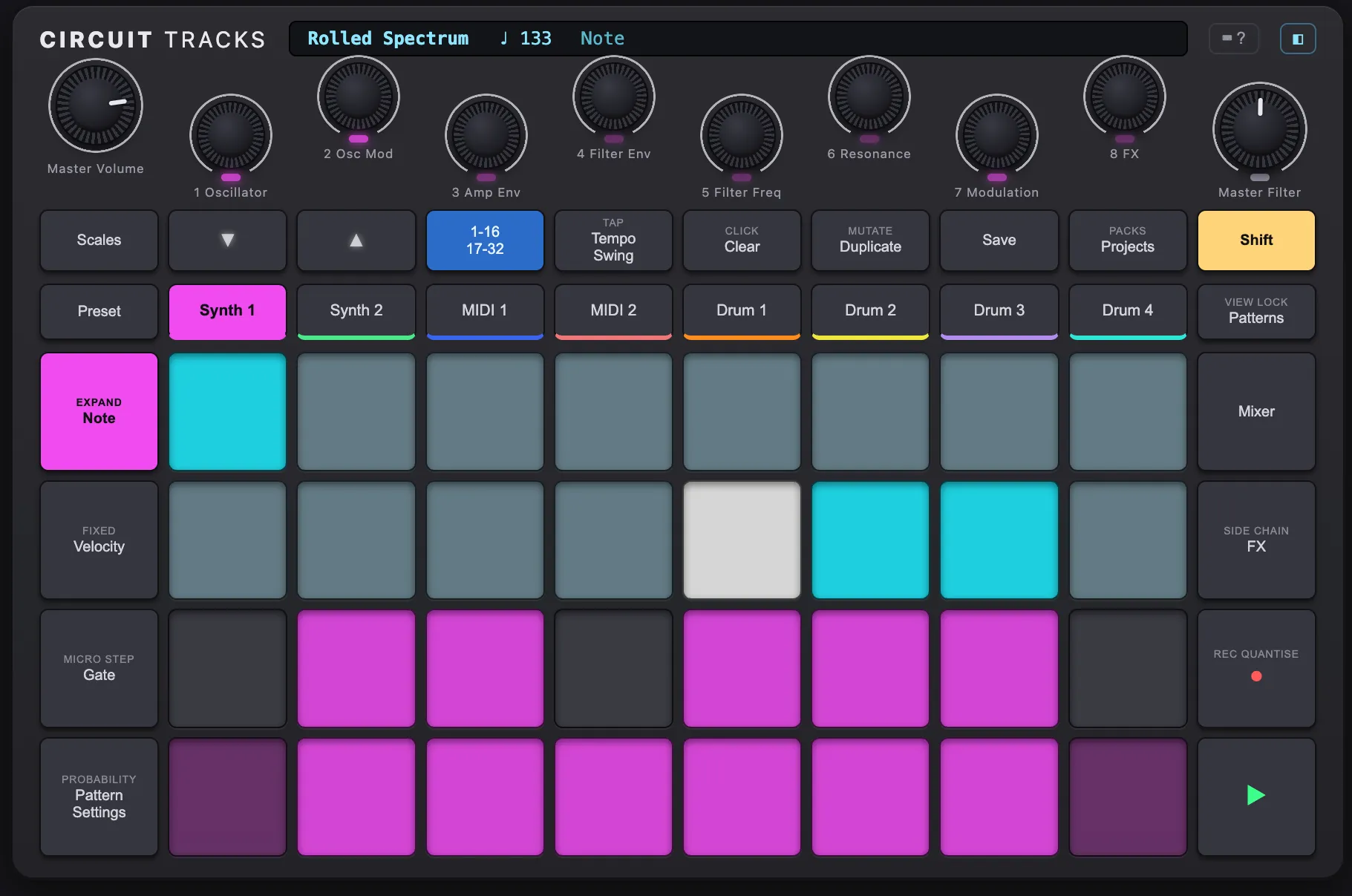
I saw many demos out there building fancy apps, super nice beautiful award-grade websites, etc. But I didn’t want to build yet another app like that. I actually wanted to see if it could do something useful (at least for me). Since I released the Circuit Tracks MCP I’ve been thinking that now that we’ve reversed engineered the project formats, it would be cool to have a virtual Circuit Tracks. Just a clone of the hardware but on a web app. Something that I find complex enough to not even start doing myself and something I tried with Opus but didn’t succeed with lots of massaging.
The initial prompt
First of all, I asked Sonnet to help me create a kinda well structured prompt. I didn’t want to write perfect English (I might be getting too lazy) and I wanted to start fast. This is what came out after 2-3 messages:
The full prompt — The Start of the Fable
# Task: Build a Web Clone of the Novation Circuit Tracks

## Goal

Build a fully functional web app that clones the Novation Circuit Tracks groovebox — playable in a browser with mouse, touch, and keyboard.

## Documentation — read these before writing any code

- `circuit_tracks_user_guide_v3_en.pdf` — hardware layout, interaction model, all features
- `circuit_tracks_programmer_s_reference_guide_v3.pdf` — synth parameters, patch format, SysEx
- `docs/ncs-format.md` — reverse-engineered .ncs project file format
- `docs/sysex-file-protocol.md` — SysEx file transfer protocol

## Assets

- `CircuitFactorySamples.zip` — 64 factory drum WAV samples; map to indices in `docs/ncs-format.md` Appendix G
- `example-patches/` — real `.syx` synth patch files captured from hardware
- `example-projects-ncs/` — real `.ncs` project files, including targeted test files:
  - `Circuit Coade Intro.ncs` — main feature-complete project
  - `WithDrums.ncs`, `FXBypass.ncs`, `FXFinal.ncs`, `MixerAndSends.ncs`
  - `SceneAndChains.ncs`, `TiedNote.ncs`, `Empty.ncs`, `1Note.ncs`

## Features

### Look & Feel

Faithful recreation of the Circuit Tracks front panel: 32 RGB pads, 8 macro knobs, Master Volume, Master Filter, and all buttons (track selectors, Scales, Note/Velocity/Gate/Probability/Pattern Settings, Mixer, FX, Patterns, Rec, Play, Shift). Pad colours must reflect the current mode and state exactly as described in the user guide.

### Input

- Mouse and touch: click/tap pads, drag knobs, click buttons
- Keyboard: mimic the physical Circuit Tracks layout — the 32 pads map to the four main keyboard rows (number row, Q-row, A-row, Z-row). Function buttons map to logical keys. Include a toggleable overlay showing the key mapping.

### Synth

Full emulation of the Circuit Tracks synth engine as documented in the Programmer's Reference Guide: two oscillators, filter, three envelopes, two LFOs, 12-slot mod matrix, 8 macro knobs (macros add to base parameter values — they don't replace them), per-patch distortion/chorus/EQ, and global reverb and delay.

### Drums

Four drum tracks playing the factory WAV samples. Per-step velocity, probability, sample flip (drum choice), and on/off. Per-track pitch, decay, distortion, EQ, pan, level, reverb send, delay send. Sidechain compression from any drum track to any synth/MIDI track.

### Sequencer

- 8 tracks: Synth 1, Synth 2, MIDI 1, MIDI 2, Drum 1–4
- 8 patterns per track, 16 or 32 steps each
- Step editing: note, velocity, gate length, tie/drone, probability, micro-step offset
- P-lock automation (per-step parameter locks)
- Pattern settings: start/end step, sync rate, playback direction
- Pattern chaining per track; 16 scenes each holding a chain assignment per track; scene chaining for arrangements
- Mutate function
- Scale quantisation (16 scale types × 12 root notes)

### Project & Patch Loading

- Drag-and-drop `.ncs` files to load a full project: patterns, patches, drum configs, FX settings, BPM, swing, mixer, scenes, sidechain
- Drag-and-drop `.syx` files onto a synth track to load a synth patch
- NCS note numbers are offset +12 from MIDI — account for this during playback

### Transport

Play/Stop, record (step and live), BPM (40–240), swing, tap tempo. Timing must be sample-accurate — not based on `setInterval` or `setTimeout`.

## Verification

After building, use the `claude-in-chrome` MCP tools to verify in Chrome DevTools — fix all issues before reporting done:

1. No console errors on load
2. Load `Circuit Coade Intro.ncs` — BPM, project name, and step data display correctly
3. Load `Empty.ncs` — no errors on an empty project
4. Load `WithDrums.ncs` — press Play, drum steps trigger the correct WAV samples at the right tempo
5. Load `FXBypass.ncs` — FX bypass state is reflected in the UI
6. Load `MixerAndSends.ncs` — mixer levels and send values load correctly
7. Drag a `.syx` file onto Synth 1 — patch name appears, synth parameters update
8. Press a pad — the synth produces audible output
9. Keyboard input triggers pads with correct RGB visual feedback
10. No layout issues at 1280×800 viewport
First Iteration
I handed all of that to Fable in one shot, and waited.
After roughly 20 minutes, I got my first version. It’s a pity I didn’t take pictures or didn’t make any real commits, because it was impressive. I only have this video I sent my friend Cristian sharing my excitement in Spanish after the second prompt:
It wasn’t perfect: not all features were implemented, but it was definitely an impressive job done in a really short amount of time.
Next Iterations
Throughout the day, and whenever I had some idle time, I’d prompt Fable to improve this or that, to look at the docs again and check whether there were any things missing in the implementation, etc. I also gave it more detailed instructions and I tested a bit with it, but whenever I found a bug, it would just fix it in one go, even with relatively vague descriptions.
End Result
After a full day of sparse prompting and little testing to fix bugs or add missing features, I had a working virtual Circuit Tracks, able to load real projects and simulating the synth engine as well as possible.
There was an unexpected bonus too. While building the clone, Fable dug into the existing parsing code and found a few real bugs in it. So the original Python library that started this whole thing also walked away better. The clone improved its own foundation.
How much did this cost?
Well, everything comes with price:
  Total cost:            $337.03
  Total duration (API):  4h 35m 17s
  Total duration (wall): 1d 1h 54m (I had Claude Code open overnight)
  Total code changes:    7760 lines added, 1232 lines removed
This whole development would have cost me $337 if I paid for all the tokens used via the API. Good thing is that Fable is still included in my subscription.
Next steps
I’m thinking about releasing this as a hobby project, but of course I want to make sure I don’t infringe any legal stuff. Don’t want to get in trouble just for fun 😅
If I can sort out the licensing, I’ll post a link right here. Stay tuned.
Conclusions
Fable is a really capable model. That’s no surprise, but feeling it is different from getting told about it. So if you have the chance, give it a try!
Responses
Loading...